
Most travelers need four to six travel apps. The right combination depends on where you are in the trip cycle. Organizing a trip is six separate jobs and no app is best at all of them. We looked at which apps handle which job.
Before your trip: Stardrift (AI planning), TripIt (organizing bookings), Google Flights (flight search), Booking.com (hotels), GetYourGuide (activities), Airalo (travel eSIM).
During your trip: Google Maps (navigation), Google Translate (translation), Wise (currency), Yelp (dining), Grab or Bolt (ride-hailing).
After your trip: Polarsteps (trip journal), Splitwise (expense settling).
What Are the Best Travel Apps to Use Before Your Trip?
1. Stardrift: Best for AI travel planning
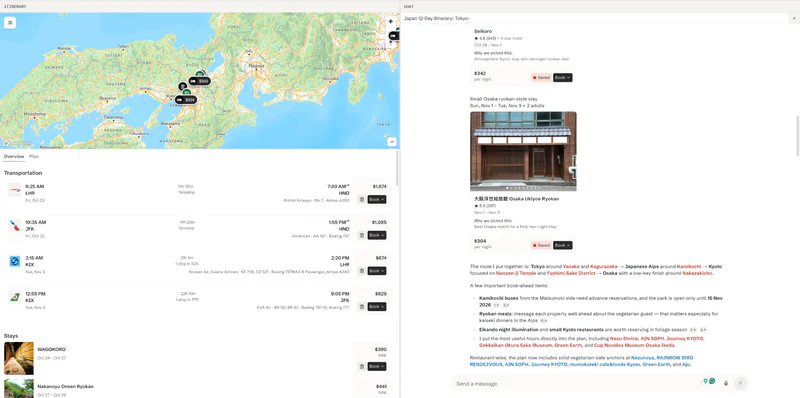
Stardrift is the best AI travel planning app in 2026. It builds complete day-by-day itineraries from your preferences and existing bookings, with preference memory that carries across trips.
Beyond the itinerary, the plan lives in a structured editor. You can drag and drop days, rearrange stops, and modify the itinerary without starting over.
There's a live map while you plan, destination cards with traveller reviews and photos, bookable flights and hotels, and calendar sync to keep your bookings in one place.
You can share the trip and plan collaboratively with whoever you're travelling with.
Core planning is free. Pro ($9.99/month or $99.99/year) adds deeper research and PDF export.
Limitations: If you only need to organize existing bookings, TripIt handles that job more reliably.
Best alternative: Mindtrip completes flight and hotel bookings inside the chat via Sabre GDS. Stronger if you want to book without leaving the AI interface. Stardrift is stronger for preference-based planning across multiple trips. Our Mindtrip review goes deeper on its in-app booking and creator guides.
New: Stardrift now imports places straight from TikTok and Instagram Reels and builds a full itinerary around them. Try now.
2. TripIt: Best for organizing existing bookings automatically
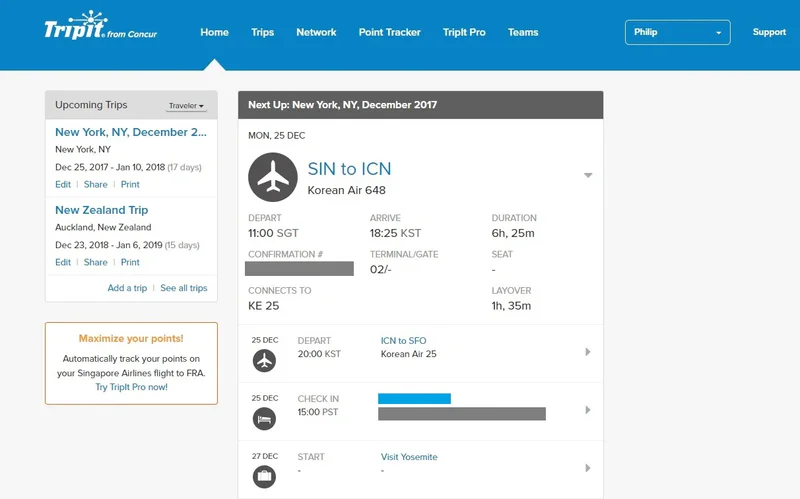
TripIt turns confirmation emails into a unified trip timeline with no manual entry. Forward any booking confirmation to plans@tripit.com or connect your Gmail inbox directly, and it parses flights, hotels, and reservations automatically.
The free tier covers full itinerary organization. Pro ($49/year) adds real-time flight alerts, gate changes, and seat tracking on travel day.
Limitations: No trip planning features. No AI. TripIt stores what you've booked. It won't help you decide what to do.
Best alternatives: Wanderlog adds collaborative planning and group editing on top of the same email import. Stardrift adds AI planning and preference memory. For a detailed comparison of all three, see Stardrift vs TripIt vs Wanderlog.
3. Google Flights: Best for searching and comparing flights

Google Flights is the fastest flight search interface available. The price calendar and date grid show the cheapest days at a glance. The Price Guarantee refunds the difference automatically when a fare drops after booking, capped at $500 per year.
It redirects to the airline or OTA to complete the booking rather than booking directly. You can also access Google Flights through Gemini.
Limitations: Doesn't search all OTAs, so some cheaper fares on smaller booking sites won't appear. Budget airlines like Ryanair, Wizz Air, and AirAsia are often missing.
Best alternatives: Kayak searches a wider net of OTAs and finds Hacker Fares, combining two one-ways from different carriers when that is cheaper than a round-trip.
Skyscanner is the better pick if your destination is flexible or you want budget airline coverage that Google often misses. Use its Everywhere search to find the cheapest destination from your departure airport.
For price predictions and flexible-date alerts, also check Hopper, which predicts whether fares will rise or fall and lets you freeze a price before committing.
4. Booking.com: Best for hotel search and flexible cancellation

Booking.com has the largest hotel inventory globally and the most flexible cancellation options. Free cancellation filters are easy to apply, useful for trips where dates might shift.
Limitations: Aggressive in-app upsells and urgency prompts on every listing.
Best alternative: Book directly with the hotel chain if you travel frequently enough to earn loyalty status. Marriott, Hilton, and IHG consistently offer better rates and room upgrades for direct bookings than OTAs.
5. GetYourGuide: Best for booking tours, tickets, and experiences

GetYourGuide covers skip-the-line tickets, guided tours, and day trips across most major destinations. Book in advance for high-demand attractions where queues can cost you hours.
Limitations: Operator quality varies. Read recent reviews before booking anything beyond a straightforward entrance ticket.
Best alternative: Klook has stronger coverage across Asia and Southeast Asia.
6. Airalo: Best for travel eSIM and data abroad

Airalo sells eSIM data plans for 200+ countries directly from your phone. Buy and activate before your flight and you have data the moment you land, with no airport SIM kiosk or phone unlocking required.
Limitations: Data only. No phone number — calls and SMS need WhatsApp or a similar app over data.
Best alternative: Saily offers a similar eSIM marketplace with competitive pricing on regional multi-country plans.
What Are the Best Travel Apps to Use During Your Trip?
1. Google Maps: Best for navigation worldwide

Google Maps is the default for walking, driving, and transit in most countries. Save places to a list before the trip and they sync to your phone. Download an offline region before flying and basic navigation works without data.
Limitations: Weaker than local apps in Japan, South Korea, and China. Transit directions don't work offline.
Best alternatives: Citymapper for urban transit in supported cities. It combines bus, subway, bike, and rideshare into a single routing result and updates in real time. Covers roughly 50 cities including London, New York, Paris, and Tokyo.
Use KakaoMap in South Korea and Baidu Maps in China. Google Maps is unreliable in both.
Maps.me for hiking, rural areas, and anywhere Google's coverage is thin. It uses OpenStreetMap data with better trail and village coverage. Fully offline and free.
OsmAnd for cyclists and hikers who need topographic maps and GPX track support.
2. Google Translate: Best for menus, signs, and camera translation

Google Translate's camera mode overlays translations on menus, signs, and labels in real time. Essential for non-Latin scripts including Japanese, Chinese, Arabic, and Thai. Download the offline language pack before traveling. Camera mode is significantly slower without it.
Limitations: Less accurate than DeepL for written European language text.
Best alternative: DeepL produces more natural translations for European languages.
3. Wise: Best for spending and transferring money abroad

Wise gives you a multi-currency account and a debit card that converts at the real interbank rate with low fees. The most useful option for frequent travelers who move between currencies or transfer money internationally.
Limitations: Account setup takes a few days. Not instant.
Best alternatives: Revolut for instant in-app currency switching, popular across Europe.
XE Currency if you only need to check conversion rates quickly while shopping.
Suica or PASMO for Japan. Load via Apple Wallet or Google Wallet. Works on trains and at convenience stores across Japan.
WeChat Pay for China. Most merchants no longer accept foreign cards. Mobile payment is effectively required.
4. HappyCow: Best for vegan and vegetarian restaurant discovery

HappyCow is the most comprehensive database of vegan and vegetarian restaurants globally. User-reviewed and regularly updated, it covers cities and smaller towns that Google Maps misses for plant-based options.
Limitations: Vegan and vegetarian only.
Best alternative: If you use Stardrift for trip planning, your dietary preferences are already saved in your profile. Stardrift builds meal suggestions around them from the planning stage, so you arrive with options already surfaced rather than searching on the ground.
5. Yelp: Best for restaurant discovery in the US

Yelp has the deepest restaurant review database in US cities, particularly in mid-sized markets where Google Maps reviews are thin. Filters for cuisine, price, and neighborhood work well. Reviews tend to be more detailed than Google's.
Limitations: Strongest in the US. Coverage drops significantly in Europe and Asia.
Best alternatives: Tabelog for Japan — locals review here, not Google. A Tabelog 3.5 rating is genuinely good.
TheFork for restaurant bookings across Europe, often with discounts. Naver Map and MangoPlate for South Korea.
6. Uber: Best as a global ride-hailing baseline

Uber operates in 70+ countries and is the most consistent option when you don't know the local alternative. Useful as a fallback anywhere unfamiliar.
Limitations: Significantly more expensive than local alternatives in Southeast Asia and parts of Europe.
Best alternatives: Grab across Southeast Asia — Indonesia, Thailand, Vietnam, Philippines, Malaysia, and Singapore.
Bolt across Europe and parts of Africa, consistently cheaper than Uber.
What Are the Best Travel Apps to Use After Your Trip?
1. Polarsteps: Best for automatic GPS route journaling

Polarsteps runs in the background and logs your route as you travel. Add photos and notes at each stop.
After the trip it generates a visual recap with your full route and timeline. Most useful for long trips, sabbaticals, and gap years where remembering the full route matters.
Limitations: Background GPS drains battery. Not a planning tool.
Best alternative: Stippl.io for travelers who prefer written journals and photo reels over GPS tracking.
2. Splitwise: Best for settling shared expenses after a group trip

Splitwise tracks who paid what during a trip and calculates the simplest way to settle up. Add expenses as they happen or enter them all after you're back. It handles multiple currencies, which makes it practical for international group travel.
Limitations: Requires all participants to have the app for the smoothest experience.
Best alternative: Tricount is simpler and doesn't require participants to create an account. Better suited for one-off trips where not everyone wants another app installed.FAQ
Frequently asked questions
What are the best travel apps for trip planning in 2026?
Stardrift is the strongest AI trip planning app in 2026, with preference memory, calendar sync, and multi-destination itinerary building. Mindtrip is the closest alternative for travelers who plan from social media inspiration and want to book flights and hotels without being redirected to another website. For a deeper comparison of AI planning tools, see our AI travel planners guide.
What are the best travel apps for iPhone in 2026?
Stardrift and Google Maps cover most trips on iPhone. One iPhone-specific advantage: Suica and PASMO load directly into Apple Wallet for Japan, with no separate transit card needed. Citymapper is noticeably better than Apple Maps for multi-modal transit in supported cities.
What are the best free travel apps in 2026?
The best free travel apps are those whose core features require no payment. Some of the best ones are Stardrift, Google Maps, Google Translate, Google Flights, Tripit, and Polarsteps.
What is the best travel app for organizing flight and hotel bookings?
TripIt is the most reliable for automatic email parsing. You can forward any confirmation and it builds the timeline. The full organizing feature is free. Stardrift does the same with AI planning on top. Choose TripIt for pure organization. Choose Stardrift if you also want help planning the trip itself.
What is the best travel app for offline maps?
Google Maps offline covers general city navigation when you download a region before flying. Maps.me is better for hiking, rural areas, and anywhere Google coverage is thin. OsmAnd for cyclists and hikers who need topographic maps. If you planned your trip in Stardrift, your saved itinerary works offline without any region download.
What is the best app for finding cheap flights?
Google Flights is the fastest starting point with the cleanest price calendar. For budget airline routes including Ryanair, Wizz Air, and AirAsia, Skyscanner has better coverage and a useful Everywhere search if your destination is flexible. Kayak adds Hacker Fares and a wider OTA search. If your dates are flexible, Hopper predicts whether fares will rise or fall and sends alerts when prices drop.
What are the best travel apps for group trips?
Stardrift for AI planning, Tricount for expense splitting, and WhenAvailable for coordinating schedules, alongside Google Travel.
What are the best TripIt alternatives in 2026?
Wanderlog adds group collaboration and full trip planning on top of TripIt-style email import, with most features free. Stardrift adds AI planning and preference memory.
What are the best travel apps for Japan?
Tabelog for restaurants is essentia. A Tabelog 3.5 rating is genuinely good. Load Suica or PASMO into Apple Wallet or Google Wallet for trains and convenience stores across Japan. Use Stardrift for multi-city Japan itinerary planning with dietary preferences already built into the plan.
What is the best app for currency conversion when traveling?
Wise gives you a multi-currency account and debit card at real interbank rates with low fees. Revolut is the popular alternative in Europe with instant in-app currency switching. XE Currency is the simplest option if you only need to check conversion rates quickly while shopping (free and works offline).
What is the minimum set of apps I need for any trip?
Stardrift covers planning, booking, and organization in one app. Add Google Maps with an offline region downloaded before your flight, Google Translate with the local language pack downloaded, and a card that works abroad at real exchange rates. Add Suica for Japan or WeChat for China. That covers most trips.