I Tested Wanderlog Pro for a Group Trip: Here Is My Honest Review
tl;dr:
After testing Wanderlog on a real-trip to Lisbon, here’s what I think about it.
The free tier is generous: You get unlimited place searching, map views, and live collaboration completely free.
Pro tier unlocks core features: Crucial tools like route optimization, offline maps, unlimited attachments, and automated inbox scanning are locked behind the Pro plan ($39.99/year), with no monthly option available.
The final verdict: If your group loves research and wants a collaborative, visual canvas to map out every detail manually, Wanderlog is great. If you want a tool to do the heavy lifting of researching and building the itinerary for you, you should look at an AI alternative like Stardrift.
What is Wanderlog?
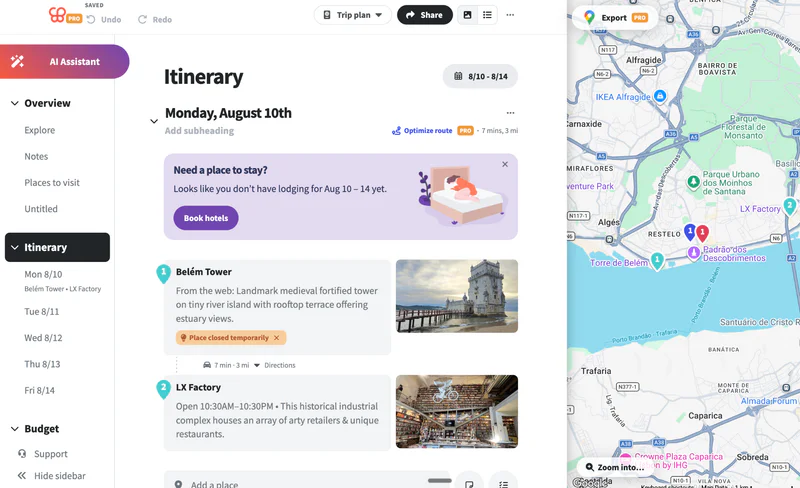
Wanderlog is a free trip planning app (with a paid Pro tier) built around a split-screen view. A day-by-day itinerary list on one side and an interactive map on the other. You search for places, drop them into a specific day, and Wanderlog plots them on the map alongside travel-time estimates between stops.
It's not primarily a chat-based AI planner, even though it has an AI assistant. The core workflow is manual and visual: search, add, drag into place, reorder. Collaboration, budgeting, and hotel search are built into the same trip document rather than being separate tools.
What Are the Most Useful Wanderlog Features?
Real-time collaborative lists
Drag-and-drop itinerary builder
User-generated guides
Built-in hotel and Airbnb search with upfront, transparent pricing
Splitwise-style expense splitter
Chrome extension (Pro) to instantly clip POI from any travel article.
Route Optimization (Pro)
Auto Gmail scanning (Pro) to import bookings
Offline access (Pro)
Export to Google Maps (Pro)
I started by creating three lists: attractions, restaurants I wanted to try, and hotels. I invited my friends to collaborate, and because the list updates in real time for everyone, whoever spotted something on TikTok or Instagram kept adding to the lists.
Once we had a good sense of where we wanted to go, I built the day-by-day itinerary by dragging places straight out of the lists we'd made into a day.
You can reorder within a day, move things between days, or leave stuff unscheduled. There's also an "Auto-fill day" AI feature that fills in a single day automatically, we skipped it since our own picks and Wanderlog's suggestions already gave us plenty. 
If you're starting from scratch instead, you can get inspired by Wanderlog’s recommendations and user-generated guides. The place search feature is also very accurate. Adding a place pulls in a photo, a short description, and live status info.
While I was creating the day-by-day itineraries, the one feature that really stood out to me was Route Optimization. It's Pro-only and once a day has enough stops, it reorders them into the fastest walking or driving sequence and hands you back a time and distance estimate for the day.
Wanderlog has a Splitwise-style expense splitter built into the trip: add an expense, pick who paid and how to split it, and everyone can check group balances and a spending breakdown inside the same planner.
For the logistics side, there's a dedicated section for flight, lodging, rental car, and train confirmations, plus general attachments (unlimited attachments is a Pro-only cap, though I couldn't find the free-tier limit stated anywhere), and Auto Gmail scanning on Pro that pulls those confirmations out of a connected inbox automatically. 
Is Wanderlog Pro worth it?
Wanderlog's Pro plan (around $39.99/year) is worth it if you travel frequently, take complex road trips, or need offline access. However, the free version already includes unlimited place-saving, live group collaboration, and map views, making Pro unnecessary for casual or local travelers.
Here is exactly what you are paying for to decide if it's worth it for you:
Offline Maps & Access: Crucial if you are traveling internationally, hiking, or going to remote locations where cell service is spotty.
Route Optimization: Automatically organizes your daily pins into the most efficient path, which is a massive time-saver for road trips.
Gmail Auto-Import: Automatically scans your email and pulls in flight and hotel bookings, saving you from manual entry.
Google Maps Export: Allows you to export your customized maps directly to the Google Maps app for actual driving directions.
Wanderlog vs. Stardrift
While both Wanderlog and Stardrift center around travel planning, their design philosophies are poles apart. To help you choose, here is how they stack up side-by-side:
Stardrift does the hard part for you, it finds the places, sequences them into an itinerary, and keeps your travel style in mind while it does it. You can try it for free on a trip now.
On the other hand, Wanderlog assumes you've already found the places and puts its energy into everything logistics-related that you'd otherwise be juggling across other apps: budgeting, hotel comparisons, reservation tracking, route timing.
Note: If you are looking for a pure travel organizer rather than a planner, Wanderlog is also often compared with TripIt. We’ve done a detailed article on Wanderlog vs. Tripit if you wish to check that out next!