If you're wondering whether to use Tripit or Wanderlog to plan your next trip, I'm here to help.
Use Tripit for automatic booking organization and flight monitoring.
Use Wanderlog for trip planning, maps, and group travel.
But if you want AI to plan your days around the bookings you've already made, use Stardrift.
Key takeaways
Tripit's inbox scanning is free and automatic. It's the easiest way to consolidate bookings from multiple providers.
Wanderlog is for planning, not just storing. Maps, activity recommendations, group editing, all on the free tier.
Tripit Pro ($49/year) is worth it if you travel frequently and want real-time flight alerts.
Wanderlog Pro ($39.99/year) adds offline maps, route optimization, and flight alerts.
Neither Tripit nor Wanderlog have AI features to help you build an itinerary around your bookings. That's where Stardrift can help.
What does Tripit do?
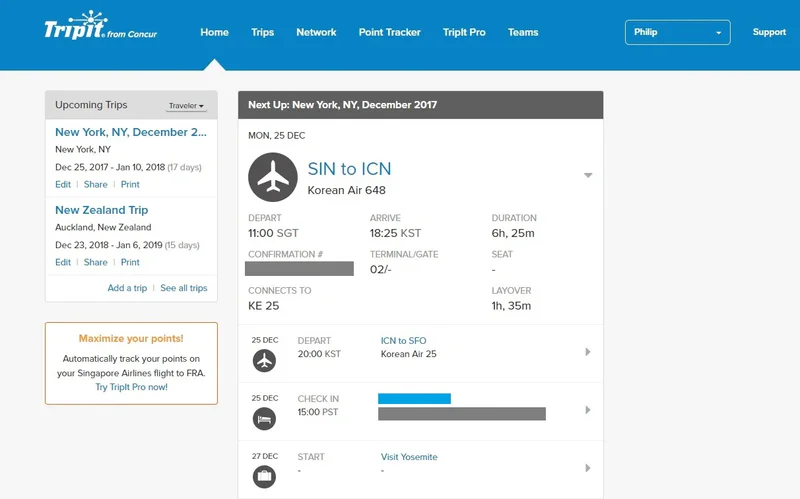
Tripit is a travel organizer. It turns booking confirmation emails into a unified trip timeline, automatically, with no manual entry required.
Connect your inbox, and Tripit picks up flights, hotels, car rentals, trains, restaurant reservations, and event bookings without you forwarding anything. It also accepts manual email forwarding to plans@tripit.com for anything it misses.
The result is a chronological itinerary with confirmation numbers, dates, times, addresses, and airport maps. All organized, searchable, and synced to your calendar.
Tripit Pro ($49/year) layers real-time intelligence on top. Flight delay and cancellation alerts, gate change notifications, alternate flight suggestions, baggage claim info, check-in reminders, a "Go Now" prompt with airport transit time, airport navigation to your gate, fare refund monitoring, a seat tracker that alerts you when your preferred seat opens up, and loyalty program tracking.
These are the features that matter on travel day, and they've saved more than a few travelers who found out about cancellations from Tripit before the airline told them.
What Tripit doesn't do
Tripit doesn't plan your days for you. There are no activity suggestions, no restaurant recommendations, no maps, and no day-by-day itinerary building.
What does Wanderlog do?

Wanderlog is a trip planning app. It gives you a map, a day-by-day itinerary builder, and tools to discover and add places, all built around the bookings you've already made.
It also imports bookings. Each trip gets a unique forwarding address, or you can paste confirmation details manually. But the import is just the starting point.
Wanderlog's actual strength is what comes next: a color-coded map, day-by-day itinerary building, activity and restaurant recommendations pulled from TripAdvisor and Google, budget tracking, and real-time collaborative editing so travel companions can plan together.
Everything you add shows up on the map filtered by day or category, so you can see what's near what and plan neighborhoods rather than crossing the city between stops.
Wanderlog Pro ($39.99/year) adds offline maps and itinerary access, route optimization, unlimited AI suggestions, automatic Gmail scanning, flight delay and gate change alerts, and PDF export. The free tier covers most trip planning needs; Pro is worth adding for offline access or if you need flight alerts.
What Wanderlog doesn't do
Wanderlog doesn't do travel-day monitoring. Its Pro flight alerts exist but are less comprehensive than Tripit's. And its inbox scanning is a paid feature. Whereas Tripit does this for free.
What's missing from both Tripit and Wanderlog?
Neither app will take your existing bookings and plan your days for you. Tripit stores everything neatly; Wanderlog hands you the tools to build the plan yourself. The actual thinking about what to do, when, where to eat, and how to sequence the day is still on you.
That's the gap Stardrift, an AI travel planner, fills.
You connect Gmail, and it automatically detects your booking confirmation emails (currently in beta), or you can sync your Google Calendar or Outlook.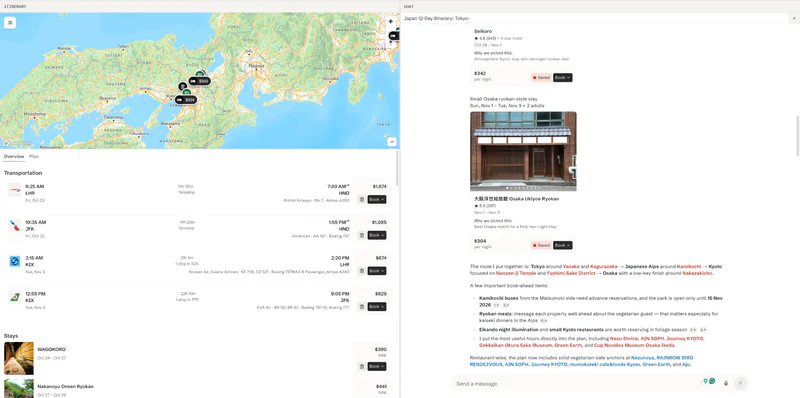
Once it has your trip, you tell it about yourself: where you're based, who you're travelling with and where they fly from, which airlines you prefer and which you avoid, what hotel brands you trust, your budget range, your pace, dietary needs, whether you're travelling for work. That preference profile is what separates Stardrift from typing a prompt into a generic AI and hoping for the best.
The itinerary it generates is specific in a way that's hard to get elsewhere. Restaurant suggestions come with opening hours and notes on what works for your diet, placed near wherever you'll already be that afternoon. Accommodation picks include per-night costs and an actual reason for each one. For multi-city trips, it handles transport routing between cities as well. Activities are sequenced by neighborhood, so you're not doubling back on yourself. And it's paying attention to your schedule: if your flight lands at 4pm and check-in isn't until 3pm, it's not sending you to a museum for five hours before you've dropped your bags.
A structured editor lets you drag and rearrange days after the fact without breaking the whole plan. A live map shows the itinerary as it builds. Trips are shareable and collaborative. You can invite travel companions, leave comments, and get a morning summary of any changes made overnight.
Stardrift Free covers the core planning. Pro ($9.99/month or $99.99/year) adds deeper research, smarter itinerary-building, better recommendations, and PDF export.
New: Stardrift now imports places straight from TikTok and Instagram Reels and builds a full itinerary around them. Try now.
What Stardrift doesn't replace
Stardrift doesn't offer Tripit's real-time flight alerts, airport navigation, and baggage claim info, or Wanderlog's offline access.
How does booking import work across TriptIt, Wanderlog, and Stardrift?
Tripit's inbox scanning requires no setup and works automatically on the free tier. Wanderlog and Stardrift require a bit more effort to get started.
Forwarding to Tripit: Send any confirmation to plans@tripit.com. Tripit parses it automatically, works with virtually any provider, and takes under two minutes per booking.
Wanderlog import: Find the unique forwarding address in your trip settings and forward confirmations there, or enter details manually. Gmail auto-scanning is a Pro feature.
Stardrift: Connect Gmail to auto-detect booking confirmations (currently in beta), or sync Google Calendar and Outlook. Set up your preference profile once and the AI builds itineraries around it from there.
How does planning intelligence compare?
Tripit doesn't plan. Wanderlog plans manually. Stardrift generates a full itinerary automatically, built around your preference profile.
Which app has better flight tracking?
Tripit Pro has the most comprehensive flight monitoring of the three. Wanderlog Pro has alerts but a narrower feature set. Stardrift doesn't monitor flights but shows Starlink in-flight wifi availability.
Where Tripit Pro pulls ahead is in the features that matter once something goes wrong: alternate flight suggestions, airport navigation, and baggage claim info aren't available in Wanderlog even on Pro.
Which app works best offline?
Tripit's free tier and Wanderlog Pro both work offline. Stardrift needs an internet connection to run its AI features, though saved itineraries remain viewable.
For international travel in destinations where data is unreliable or expensive, Wanderlog Pro's offline maps are a real advantage. Tripit covers offline itinerary viewing on the free tier, but without maps.
Which is better for group travel?
Wanderlog is the most capable collaborative planning tool. Everyone on the trip can edit the itinerary simultaneously, add places, move things around, track the shared budget, and split expenses. It's the app equivalent of a shared Google Doc for your trip.
Stardrift approaches group travel differently. The preference layer isn't just for solo travelers. You can set it up for everyone in the group, so the AI accounts for multiple people's airlines, dietary needs, hotel preferences, and budgets when it builds the plan.
Instead of everyone negotiating over a map and trying to find something that works for all six people, you get a plan that's already thought through.
Once the AI has generated the itinerary, the trip is collaborative. Invite members, edit together, leave comments, and get morning updates on any overnight changes.
Tripit lets travel partners see a shared itinerary but not edit it together.
How much do Tripit and Wanderlog cost?
Tripit Pro costs $49/year. Wanderlog Pro costs $39.99/year. Stardrift Free covers core planning, and Pro runs $9.99/month or $99.99/year.
When to Use Tripit, Wanderlog, or Stardrift?
The strongest workflow for complex trips pulls in all three. Use Stardrift to generate the initial day-by-day plan around your existing bookings.
Forward confirmations to Tripit so you have a clean timeline and real-time flight coverage.
Bring Wanderlog in if you're travelling with a group, or if you're headed somewhere with unreliable data.
Frequently asked questions
What is the easiest way to organize existing travel bookings in one app?
Connect your inbox to Tripit. It scans automatically and builds a timeline from your confirmation emails, no forwarding or manual entry needed. It's free, and it works with virtually every airline, hotel, and booking platform.
Does Wanderlog have email forwarding like Tripit?
Yes. Each Wanderlog trip gets a unique forwarding address. Forward a confirmation there, and it auto-imports. Gmail auto-scanning is a Pro feature ($39.99/year). Tripit's inbox scanning is free.
Is Tripit Pro worth $49 per year?
For frequent travelers, yes. The flight alerts, alternate flight suggestions, airport navigation, and baggage claim info are the features that justify the cost on travel day. If you're taking one or two trips a year, the free tier is enough.
Can Wanderlog replace Tripit?
No, for booking organization and travel-day monitoring, Tripit is better. Its inbox scanning is free, where Wanderlog's is paid, and its Pro flight features are more comprehensive. But for trip planning, Wanderlog is the more capable tool.
What does Stardrift do that Tripit and Wanderlog don't?
It generates a complete day-by-day itinerary from your existing bookings, built around a detailed preference profile — your airlines, hotel brands, budget, dietary needs, travel companions, and base location. For group trips, it accounts for everyone's preferences simultaneously, so you're not manually negotiating a plan that works for six people. Neither Tripit nor Wanderlog automates this.
Can Stardrift import bookings automatically?
Gmail Connect is available in beta, which lets Stardrift auto-detect booking confirmation emails from your inbox. Google Calendar and Outlook sync are also supported.
Which tool is best for international trips without reliable data?
Wanderlog Pro. It offers offline itineraries and downloadable maps, which makes a real difference in destinations where data is patchy or expensive. Tripit's free tier covers offline itinerary viewing without maps. Stardrift needs an internet connection for its AI features.
Which tool is best for someone who has flights and hotels booked but needs help planning activities?
Stardrift. Set up your preference profile, add your bookings, and it generates a sequenced plan tailored to how you travel. Wanderlog is the alternative if you prefer to build the plan yourself on a map.
Can I use Tripit and Stardrift together?
Yes, and it's a natural pairing. Tripit handles booking consolidation and flight monitoring. Stardrift handles day planning. They cover different jobs with no overlap.
Is there an app that both imports bookings and plans activities automatically?
Yes, Stardrift generates AI-planned days around your bookings.
Can I organize bookings from different airlines and hotel sites in one place?
Yes. Tripit, Wanderlog, and Stardrift all consolidate multi-source bookings. Tripit handles the widest range automatically through inbox scanning and email forwarding.
Can Google Travel replace a dedicated trip organizer?
For a single-flight, single-hotel trip it works fine as a passive reference. For multi-city trips, activity planning, group travel, or anything requiring editing and offline access, you'll want a dedicated tool.