How to Use ChatGPT for Travel Planning?
ChatGPT is genuinely good at anything you can answer in one shot. Ask for a hotel, a flight price, a day plan, and it hands back something specific and usable. It falls short if you need personalization, collaboration, or booking features.
I tested ChatGPT on a real trip, and in this article I share my experience of how I used it and where it fell short.
What can ChatGPT actually do for travel planning?
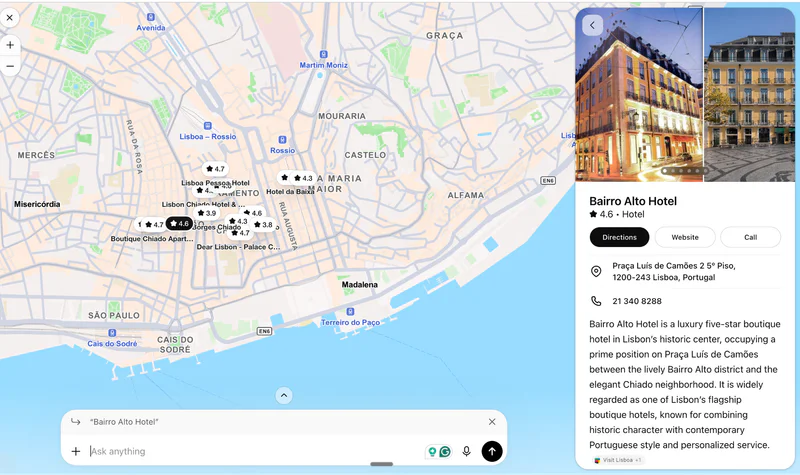
Draft a day-by-day itinerary structured by neighborhood, with realistic pacing
Search live hotel listings with real prices, ratings, and an interactive map
Quote live flight fares by airline and route once you give it dates
Export itinerary to Google calendar (limited to paid plans)
How to use ChatGPT for travel planning (step by step)
1. Start with a detailed prompt
Mention everything important upfront. For example:
“Plan a [X]-day trip to [destination], [dates]. Travelers: [who, ages]. Budget: [amount, incl./excl. flights].
Pace: [slow / moderate / packed]. Getting around by [walking / transit / car].
I want: [interests]. I want to avoid: [dislikes]. Food: [preferences, restrictions]. Staying in: [hotel/apartment, neighborhood].
Give me a day-by-day plan with rough timings, 2 named restaurant options per day with prices, and a daily cost estimate. Flag what needs booking ahead. Ask me questions first if anything's unclear.”
I made the mistake of not going into specifics and I got a pretty generic itinerary.
2. Iterate on the draft
Treat the first output as a starting point. Useful follow-ups:
"Day 3 is too packed. Cut it to two activities and add a slow afternoon."
"This is very tourist-heavy. Swap three of these for things locals actually do."
"Reorder so we're not crossing the city twice in one day."
"What did you leave out that I might regret missing?"
The reordering request is underrated. First drafts often ignore geography, putting stops in an order that wastes hours in transit.
3. Verify the facts
Take the itinerary and check the load-bearing details yourself:
Opening hours and closure days (many European museums close Mondays; many Asian sites close for local holidays)
Whether attractions need advance tickets and how far ahead they sell out
Transport schedules, especially ferries, regional trains, and anything seasonal
Visa and entry requirements. Check the official government source
Restaurant existence and reservation policies
What are ChatGPT's limitations for trip planning, overall?

Ask it to plan a trip cold, and it won't ask what your budget is, what you can't eat, or what dates you're actually traveling. It picks something plausible and runs with it, and you find out what it assumed after the fact. You can expect a lot of back and forth to get a usable itinerary.
It searches flights and hotels well, with real names and estimated prices. It can't book either one. Every option ends the same way: go finish this on the airline's site, or Booking.com, or Expedia.
There's no way to actually plan together. Sharing gives the other person a read-only link, not something you can both edit. If your partner wants to add a restaurant, they're pasting the whole itinerary into their own chat and hoping it comes out the same.
The memory is thinner than it lets on, too. I asked it to save a list of restaurants for a future trip. Weeks later, in a new chat, it remembered I'd asked for a list. The list itself was gone.
What is the best ChatGPT alternative for travel planning?
If what's bothering you is re-explaining the same trip constraints every time, that's the gap Stardrift is built to close. Set your preferences once, such as budget, pace, dietary needs, preferred airlines and hotels, and they carry into every trip after.
You can import your existing bookings through Gmail Connect or search for flights, hotels, and activities and book them in-app.
Trips are shareable with real-time co-editing and @mentions, so your partner isn't stuck re-pasting a plan into a separate chat.
You can even import inspiration from Tiktok and Instagram reels, so you’re never starting a trip from scratch.
And when the AI puts the itinerary together, you can edit it using the drag and drop editor, and the control stays in your hands.
You can use Stardrift for free, but there’s also a pro plan that gives you access to better AI models and Google Calendar export. Try it now!